
In-App Purchases Overview
The in-app purchase service sells your products for real money through the platform’s own store: Google Play on Android and the App Store on iOS. The SDK starts the store, keeps the list of products on sale up to date, reports every purchase to analytics, and keeps track of every purchase the player paid for until your game delivers it.
How it works
- You list your products in the Live Ops Dashboard under the
IAPConfigmodule of the Configuration section of your game. - When configurations are initialized, the SDK reads that list and starts the store with it. If the list is empty, the store is not started.
- Every time a newer configuration is applied, the SDK compares the products in it with the ones on sale and updates the store when they differ.
- Your game reads the products with their store prices and calls
Purchase()when the player buys one. - You deliver what the player bought and call
FinishTransaction(). Until you do, the purchase stays owed to the player, across app restarts.
You never hand the SDK a product list yourself. The products on sale are always the ones in the configuration.
Accessing the service
using PlayOps.InAppPurchases;using TactileModules.InAppPurchase;
PlayOpsInAppPurchases inAppPurchases = playOpsSDK.InAppPurchases();
The product, transaction and result types live in the TactileModules.InAppPurchase namespace.
Configuration has to be initialized
The store starts when configurations are initialized, not when the SDK is. Make sure your game calls Initialize() on the configuration service at startup:
var configurations = playOpsSDK.Configurations();configurations.Initialize();Until then the store has nothing to sell, and every purchase answers StoreUnavailable.
Which products are sold
Only consumable products are sold. A product in IAPConfig with any other product type, or without an identifier, is skipped and a warning is logged.
Configuring products on the dashboard
- Go to the Live Ops Dashboard under your game.
- Open the Configurations service.
- Search for the
IAPConfigmodule. - Configure the products. Each entry in
InAppProductsis one product. - Publish the configuration. The SDK only receives published configuration, on the game’s next sync. Until you publish, players keep the products they had.
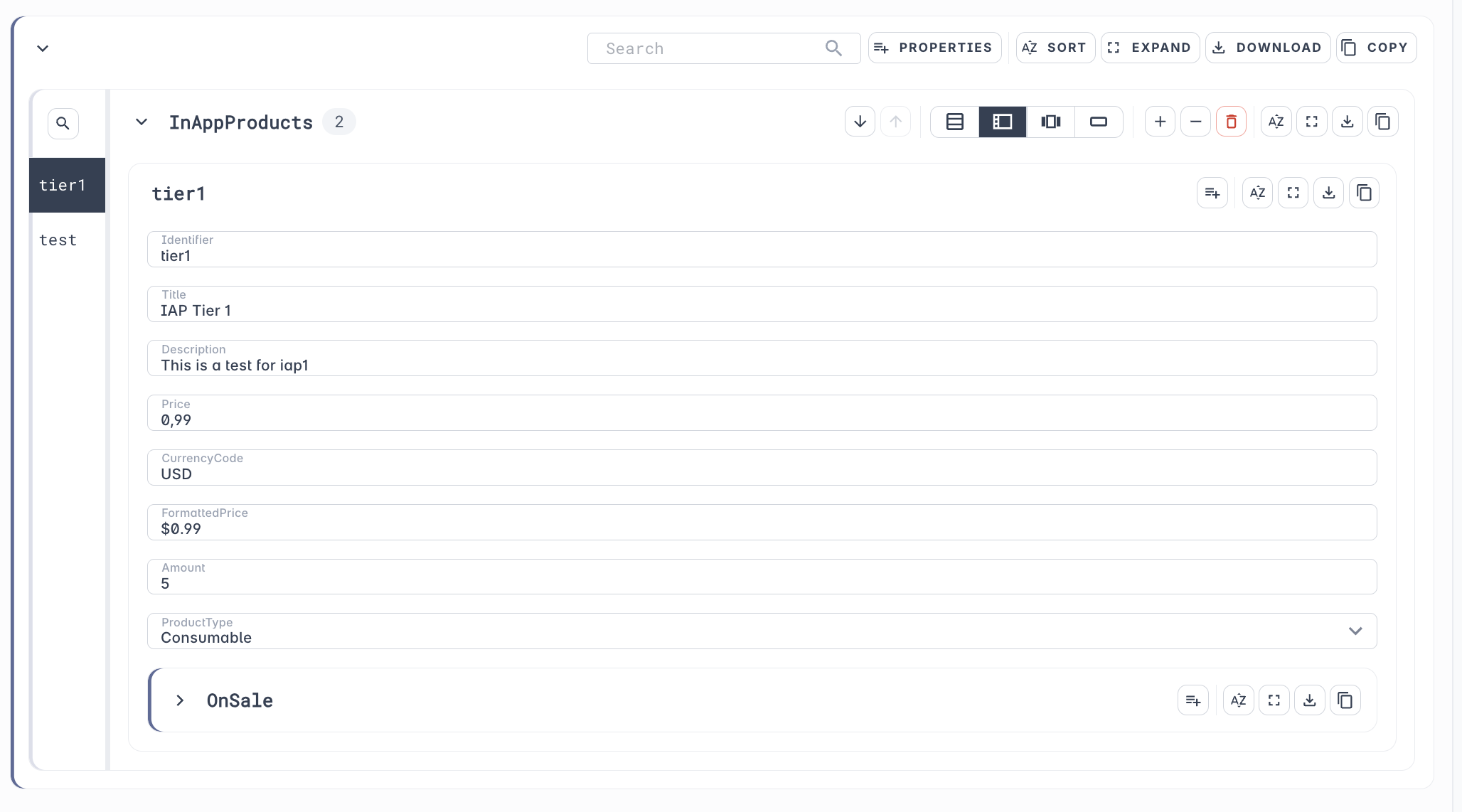
The product identifier
Identifier is only the last part of the product’s store identifier. The SDK builds the rest from your app’s bundle identifier.
Fields
| Field | What the SDK does with it |
|---|---|
Identifier | The last part of the store identifier. See The product identifier. |
Title | Shown as the product’s Title until the store sends its own. |
Description | Only used by the development store, which the SDK uses in the editor and in development builds. |
Price | Reported in the purchase analytics events, in cents: 0.99 is reported as 99. The development store also reports it as the store price. |
CurrencyCode | Only used by the development store. |
FormattedPrice | Shown as the product’s FormattedPrice until the store sends its own price. |
Amount | Not read by the SDK. |
ProductType | Must be Consumable. Products of any other type are skipped. |
OnSale | Not read by the SDK. |
What’s next
- Making a Purchase — show products and buy one
- Recovered and Unfinished Purchases — deliver purchases no purchase call is waiting for
- Store State — know whether the store can sell right now
- Purchase Analytics — the events the service reports for you